name: inverse layout: true class: center, middle, inverse, first --- count: false # What is Web? .small[  ] --- layout: false .left-side[ # About me ## Vytautas Kavaliauskas ### graduated in 2011 ### web developer (back-end) ### basketball fan ### loves board games ### reads sci-fi books ] .right-side.me.light.center[  ### vytautas.k@datadog.org ### https://github.com/vytautas-k ] --- # Agenda * How the Web works: * Basics of HTTP, request and response, cookies * HTTP server: * Nginx with demo * PHP: * Basic of PHP, install and demo * Database: * Types of databases, about Mysql, install and demo --- template: inverse # How the Web works?  --- # How the Web works? * What happens when we enter URL? * How browser communicates with remote source? * How these fancy websites are shown on my browser? * How do we know what we get? ## Answer - HyperText Transfer Protocol (HTTP) ??? * Communication language between server and client: * HyperText Transfer Protocol (HTTP) * Actual data process between server and client - **TCP/IP** * HTTP multiple requests for assets (image, css, js) * Terminology: client = user agent --- # Communication example .center[ 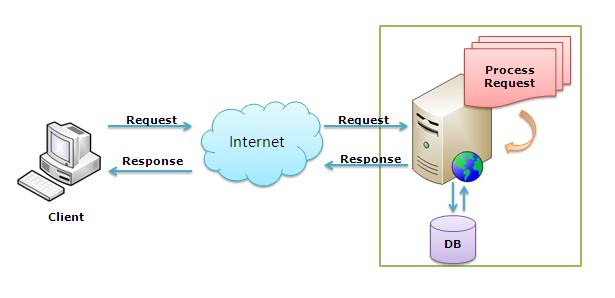 ] ## Basic form or URL: **protocol**://**server**/**request-URI** --- # HTTP Request .left-side[ ## Example request ```dos GET /index.html HTTP/1.1 Host: www.example.com ``` ### Components: ```default Method: GET URI: /index.html Version: HTTP/1.1 Headers: "Host: www.example.com" Body: empty ``` ] .right-side[ ## Request structure ```yaml [METH] [REQUEST-URI] HTTP/[VER] [fieldname1]: [field-value1] [fieldname2]: [field-value2] [request body, if any] ``` ] ??? * 4 HTTP versions: 0.9, 1.0, 1.1, 2.0 (multiplexing, header compression, prioritarization) * HTTP Methods: GET, POST, PUT, HEAD, PATCH * HTTP body only with POST, PUT, PATCH * Lots of headers: content type, language, authentification, etc. --- # HTTP Response ### Request structure ```github [HTTP]/[VER] [CODE] [TEXT] Field1: Value1 Field2: Value2 Document content ``` ### Example response ```github HTTP/1.0 200 OK Server: Netscape-Communications/1.1 Date: Tuesday, 25-Nov-97 01:22:04 GMT Last-modified: Thursday, 20-Nov-97 10:44:53 GMT Content-length: 6372 Content-type: text/html <!DOCTYPE HTML PUBLIC "-//W3C//DTD HTML 3.2 Final//EN"> ...followed by document content... ``` ??? * Date - current server datetime * Content type: "text/hml", "text/plain", "image/gif" --- # HTTP Status Codes .left-side[ * 1xx - Informational * 2xx - Successful * 3xx - Redirection * 4xx - Client error * 5xx - Server error ] .right-side[ ```yaml 100 Continue 200 OK 201 Created 202 Accepted 301 Moved Permanently 302 Found 304 Not Modified 307 Temporary Redirect 403 Forbidden 404 Not Found 405 Method Not Allowed 418 I am a teapot 500 Internal Server Error 502 Bad Gateway 503 Service Unavailable ``` ] --- # Cookies (om nom nom) * Small files stored on computer via browser * Use to carry information between session on website * Stores pairs of key/data values * Examples: user settings, login, visitor tracking, ads, ... ??? * Expiration time * Privacy concerns --- template: inverse # HTTP Server  --- # HTTP Server ### A Web server is a program that uses HTTP (Hypertext Transfer Protocol) to serve the files that form Web pages to users, in response to their requests, which are forwarded by their computers' HTTP clients. * More than 30 different web server software * Used on Windows, Linux, OS X, etc. * Popular: [Apache HTTP Server](https://httpd.apache.org/), [NGINX](https://www.nginx.com/resources/wiki/), [Microsoft-IIS](https://www.iis.net/), [Apache Tomcat](http://tomcat.apache.org/), [Lighttpd](https://www.lighttpd.net/) ??? * Apache is used by ~50% servers * NGINX ~30% --- # HTTP Server - NGINX ## NGINX is a free, open-source, high-performance HTTP server * High performance, stability, rich feature set, simple configuration, and low resource consumption. * Powers Netflix, Pinterest, Airbnb, WordPress.com, GitHub, SoundCloud, etc. --- # NGINX Install & Config ### Install (on Ubuntu/Debian) ```dos sudo apt-get update sudo apt-get install nginx ``` ### Important files and directories ```dos /usr/share/nginx/html - actual web content /var/www/html - preferred web content location /etc/nginx/nginx.conf - main Nginx configuration file /var/log/nginx/error.log - errors will be recorded here ``` ??? `curl -i www.google.com` --- template: inverse # Need more action? Here's PHP! .center[  ] --- # PHP (PHP: Hypertext Preprocessor) ### Open source general-purpose scripting language that is especially suited for web development and can be embedded into HTML. ### Much like HTML, CSS and JavaScript are used to make instructions for the end user's web browser. ### What do we need: * The PHP parser (CGI or server module) * File which contains `<?php` and `?>` tags and also has extension .php --- # PHP Install & Config ### Install (on Ubuntu/Debian) ```dos sudo apt-get update sudo apt-get install php5-fpm php5-cli ``` ### Config ```dos /etc/php5/fpm/php.ini - main PHP configurational file /etc/php5/fpm/pool.d/www.conf - FPM pool config file ``` To get list of available PHP modules: ```dos apt-cache search php- | less ``` More information can be found on http://php.net/manual/en/tutorial.php ??? * https://www.digitalocean.com/community/tutorials/how-to-install-linux-nginx-mysql-php-lemp-stack-on-ubuntu-12-04 `php -a ... CTRL+D` --- template: inverse # Where to store/retrieve things? .center[  ] --- # Databases .center[ 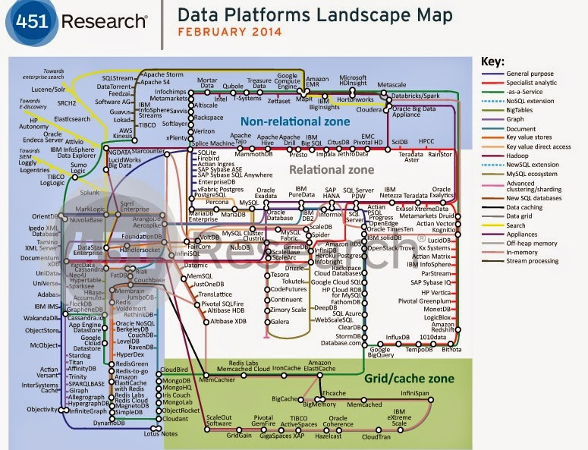 ] --- # Databases * There are various types of databases: * Flat-file Database * Relational Database (RDBMS) * Non-relational Databaes (NoSQL) * .. ### Mostly used database management systems: * Oracle, MySQL, Microsoft SQL, PostgreSQL, MondoDB --- # MySQL ## MySQL is an open-source relational database management system (RDBMS) * Uses Structured Query Language (SQL) to store/retrieve information * Written in C and C++ * Is also used in many high-profile: Google, Facebook, Twitter, Youtube --- # MySQL Install & Setup ### Install (on Ubuntu/Debian) ```dos sudo apt-get update sudo apt-get install mysql-server php5-mysql ``` ### Setup ```dos sudo mysql_install_db - activate MySQL server sudo /usr/bin/mysql_secure_installation - setup MySQL (set password, secure, etc.) ``` Communicates with PHP via php5-mysql extension More information can be found on http://php.net/manual/en/mysqli.examples-basic.php ??? * https://www.digitalocean.com/community/tutorials/how-to-install-linux-nginx-mysql-php-lemp-stack-on-ubuntu-12-04 --- template: inverse # Is there an easy way to setup? .center[  ] --- # Solution Stacks ### A solution stack (software stack) is a set of software subsystems or components needed to create a complete platform. ### In the case of a web application the architect defines the stack as the: * target operating system * web server * database * programming language --- # AMP Solution Stack * **LAMP** - Linux, Apache, MySQL, PHP* * LAPP - Linux, Apache, PostgreSQL, PHP* * LNMP - Linux, Nginx, MySQL, PHP* * **WAMP** - Windows, Apache, MySQL, PHP* * MAMP - Mac OS X, Apache, MySQL, PHP* .footnote[.red.bold[*] Can also be Perl or Python] --- # Install LAMP Stack ## One package installation solution (Ubuntu): ```dos sudo apt install tasksel sudo tasksel install lamp-server ``` ## More in depth installation: ### How to install LAMP on Ubuntu - https://goo.gl/sgMGLT ### How to install LAMP stack by DigitalOcean - https://goo.gl/GQqqCT --- # Install WAMP Stack ### Visit http://www.wampserver.com/en/ and download WampServer installer and install it on Windows OS. ### It will also contain PhpMyAdmin - tool for MySQL database management via your browser. ### Visual C++ Redistributable for Visual Studio 2012 Update 4 might be needed for WampServer to work properly. --- template: inverse # Questions? --- template: inverse # Thank you for your attention! .white[ ### vytautas.k@datadog.org ### https://slides.kavaliauskas.net ]