name: inverse layout: true class: center, middle, inverse, first --- count: false # Version Control Systems .small[  ] --- layout: false .left-side[ # About me ## Vytautas Kavaliauskas ### graduated in 2011 ### web developer (back-end) ### basketball fan ### loves board games ### reads sci-fi books ] .right-side.me.light.center[  ### vytautas.k@datadog.org ### https://github.com/vytautas-k ] --- # Agenda * What is Version Control Systems (VCS) * Differences between VCS * Git * Using Git with examples --- template: inverse # What Is Version Control Systems?  --- # What Is Version Control Systems? ## Version control systems are a **category of software tools** that help a software team manage changes to source code over time. * Keeps track of every modification to the code * Allows to turn back the clock and compare earlier versions of the code * Helps fix the mistake while minimizing disruption to all team members ??? * Tracks every individual change by each contributor and helps to prevent concurrent work from conflicting * VCS are sometimes known as SCM (Source Code Management) tools or RCS (Revision Control System) --- # What Good VCS Should Do? * Support a developer's preferred workflow without imposing one particular way of working * Work on any platform, rather than dictate what operating system or tool chain developers must use * Facilitate a smooth and continuous flow of changes to the code ??? * Frustrating and clumsy mechanism of file locking * Giving the green light to one developer at the expense of blocking the progress of others --- # But I Don't Need VCS! ## You can code without any VCS, but then you need to: * know which changes are available to users * not make any incompatible changes between components * keep track of changes in files by adding crazy sufixes like "first", "final", "done", etc. * comment out some code which might be needed later --- template: inverse # Differences Between VCS  --- # Types Of Version Control Systems * Local Data Model * Revision Control System (RCS) * Source Code Control System (SCCS) * Client-Server Model * Concurrent Versions System (CVS) * Subversion (SVN) * Vesta ??? * Local Data Model * backward or interleaved deltas * Client-Server Model * Concurrent Versions System (CVS) – originally built on RCS * CVSNT – cross-platform port of CVS * OpenCVS – CVS clone, with emphasis put on security and source code correctness * Subversion (SVN) – versioning control system inspired by CVS * Vesta – build system with a versioning file system and support for distributed repositories --- # Concurrent Versions System (CVS) * Has been in use for many years (mature technology) * Moving or renaming files does not include a version update * Security risks from symbolic links to files * No atomic operation support, leading to source corruption * Branch operations are expensive (not designed for long-term branching) ??? * CVS is the grandfather of revision control systems * It was first released in 198 --- # Apache Subversion (SVN) * Newer system based on CVS * Still contains bugs relating to renaming files and directories * Includes atomic operations * Does not use peer-to-peer model * Wide variety of plug-ins for IDEs * Slower comparative speed ??? * Is used at SourceForge, Apache, Python, Ruby --- # Mercurial * Distributed model * No merging of two parents * Extension-based rather than scriptability * Less out of the box power * Good documentation ??? * Was developed to compete with Git for Linux kernel development * Used at OpenOffice.org --- # Git * Distributed, peer-to-peer model * Dramatic increase in operation speed * Fast branch operations * Full history tree available offline * Learning curve for those used to SVN ??? * Developed by Linus Torvalds of Linux (2005-07-11) * Used on Android, Drupal --- # Tools You Can Use With VCS ## There are lots of tools for developers, which support one or multiple VCS. As in example, you can use: * Tortoise CVS/SVN * Eclipse * NetBeans * Meld * Xcode --- template: inverse # Git Is Awesome! .center[  ] --- # What's Special About Git? * Uses stream of snapshots instead of list of file-based changes * Like a mini filesystem with build in tools * Nearly every operations are local * Uses checksums (hashes) for integrity * Has 3 main states: committed, modified, and staged --- # The 3 Main Sections Of A Git Project .center[ 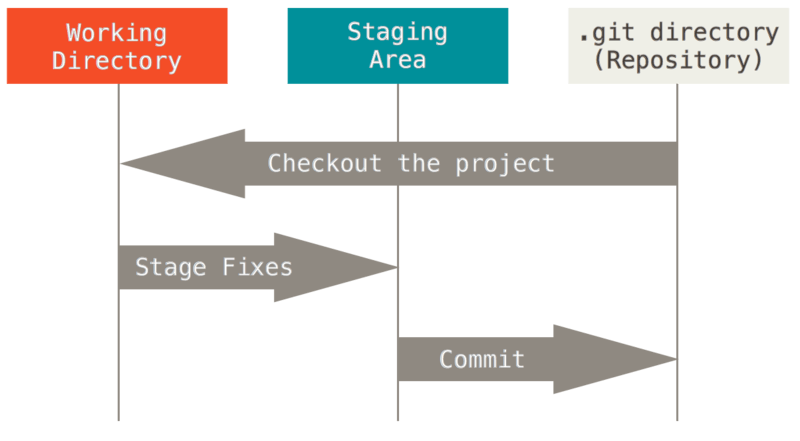 ] ??? * Git directory - metadata and object database of project * Working tree - a single checkout * The staging area - stores information about what will go into your next commit --- # Git Install & Config ### Install (on Ubuntu/Debian) ```dos sudo apt-get update sudo apt-get install git-all ``` ### Set username and email ```dos git config --global user.name "John Doe" git config --global user.email johndoe@example.com ``` ### Check config ```dos git config --list ``` ??? Without --global can set local setup ``` git config user.name ``` --- # Start Using Git ### To start tracking existing project ```dos cd /home/user/your_repository git init ``` ### To clone existing repository ```dos git clone https://some-url.com/repo/project git clone git://user@server:path/to/repo.git ``` --- # Record Git Changes ### To check status ```dos git status ``` ### To track new file ```dos git add [file-name] ``` ### To ignore file changes ```dos nano .gitignore ``` --- # Working With Git ### To see differences between unstage files or staged (_--staged flag_) ```dos git diff ``` ### To commit changes ```dos git commit ``` ### To remove file ```dos rm [file-name] git rm [file-name] ``` ??? * git commit -m * git commit --amend --- # Working With Git [2] ### To view project history ```dos git log ``` ### To create new branch and checkout ```dos git checkout -b [branch-name] ``` ### To delete branch ```dos git branch -d [branch-name] git branch -D [branch-name] ``` --- # Working With Git [3] ### To get changes from remote repository ```dos git fetch ``` ### To apply updates from remote ```dos git pull ``` ### To publish updates to remote repository ```dos git push origin [branch-name] ``` --- # Resources to master Git * https://git-scm.com/doc * https://www.atlassian.com/git/tutorials/learn-git-with-bitbucket-cloud * https://try.github.io/levels/1/challenges/1 * http://learngitbranching.js.org/ * https://www.git-tower.com/blog/git-cheat-sheet/ --- template: inverse # Questions? --- template: inverse # Thank you for your attention! .white[ ### vytautas.k@datadog.org ### https://slides.kavaliauskas.net ]